Download Progress in Notification
A download progress bar in a notification is a visual indicator displayed in the notification area of a device to show the progress of a file download. This feature provides users with real-time feedback on the status of their downloads without having to open the app.
Download progress bar in a notification enhances user experience by reducing uncertainty and providing a sense of how much time is remaining for the download to complete.
When downloading a file, users can use other apps and still monitor the download progress through notifications without needing to open the app.
Implement Download Progress in Notification in WaveMaker Application
Adding rn-fetch-blob Plugin to your WaveMaker App
- rn-fetch-blob
RNFetchBlob plugin can be installed in a few steps in a WaveMaker application. Please refer to this page on how to install the plugin.
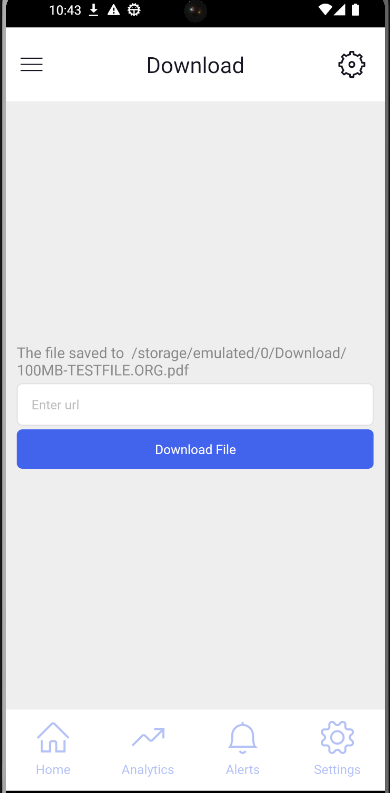
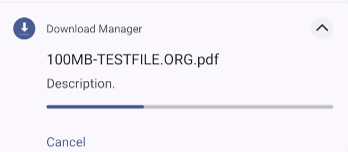
The following is the code snippet for the above mockup
const RNFetchBlob = require('rn-fetch-blob').default;


Page.downloadfileTap = function($event, widget) {

    const image = Page.Widgets.urlinput.datavalue;
    let dirs = RNFetchBlob.fs.dirs;

    const filename = image.substring(image.lastIndexOf('/') + 1, image.length);

    let fileExt = getExtention(image);
    fileExt = '.' + fileExt[0];
    var mimeType = '';

    if (fileExt === 'png' || fileExt === 'jpg' || fileExt === 'jpeg') {
        mimeType = 'image/*';
    }
    if (fileExt === 'pdf') {
        mimeType = 'application/pdf';
    }
    if (fileExt === 'avi' || fileExt === 'mp4' || fileExt === 'mov') {
        mimeType = 'video/*';
    }

    RNFetchBlob.config({
            fileCache: true,
            path: dirs.DownloadDir + '/' + filename,
            addAndroidDownloads: {
                useDownloadManager: true,
                mime: mimeType,
                notification: true,
                title: filename,
                description: 'Description.',
                mediaScannable: true,
                path: dirs.DownloadDir + '/' + filename,
            },
        })
        .fetch('GET', image)
        .then(res => {
            if (Platform.OS === 'android') {
                Page.messageLabel = `The file saved to  ${res.path()} `;
                Page.Widgets.urlinput.datavalue = ''
            }
            Page.refresh();
        })

        .catch(error => {
            Page.messageLabel = `Error creating directory: ${JSON.stringify(error,null,2)}`;
            Page.Widgets.urlinput.datavalue = ''
            Page.refresh();
        });

};


const getExtention = filename => {
    // To get the file extension
    return /[.]/.exec(filename) ? /[^.]+$/.exec(filename) : undefined;
};